
| 일 | 월 | 화 | 수 | 목 | 금 | 토 |
|---|---|---|---|---|---|---|
| 1 | 2 | 3 | ||||
| 4 | 5 | 6 | 7 | 8 | 9 | 10 |
| 11 | 12 | 13 | 14 | 15 | 16 | 17 |
| 18 | 19 | 20 | 21 | 22 | 23 | 24 |
| 25 | 26 | 27 | 28 | 29 | 30 | 31 |
- npm install
- slickslider
- npm install 문제
- maxwidth
- window 정책변경
- node 오류
- 그누보드반응형
- legacy-peer
- 동적객체
- owlcarousel
- vscode git clone
- package.json
- minwidth
- 글자들여쓰기
- 의존성문제
- git lab clone
- Git clone
- 정적객체
- MediaQuery
- react npm install
- node설치
- 단어단위로떨어지기
- 플러그인
- 아이콘사용법
- npm start
- 이미지반응형
- fontawesome
- XEIcon
- googleicon
- 웹아이콘
- Today
- Total
어쩌다 알게 된 ƪ(•̃͡•̃͡ ƪ
[React] Bootstrap scss v5.1.3 본문
** Bootstrap 최신 공식문서
Bootstrap
Powerful, extensible, and feature-packed frontend toolkit. Build and customize with Sass, utilize prebuilt grid system and components, and bring projects to life with powerful JavaScript plugins.
getbootstrap.com
** Bootstrap v5.1.3 기본 공식문서
https://getbootstrap.com/docs/5.1/getting-started/introduction/
Introduction
Get started with Bootstrap, the world’s most popular framework for building responsive, mobile-first sites, with jsDelivr and a template starter page.
getbootstrap.com
** Bootstrap scss 공식문서
https://getbootstrap.com/docs/5.1/customize/sass/
Sass
Utilize our source Sass files to take advantage of variables, maps, mixins, and functions to help you build faster and customize your project.
getbootstrap.com
** Bootstrap 버튼 class 공식문서
https://getbootstrap.com/docs/5.1/components/buttons/
Buttons
Use Bootstrap’s custom button styles for actions in forms, dialogs, and more with support for multiple sizes, states, and more.
getbootstrap.com
** Bootstrap 변수 파일
📁 node_modules/bootstrap/scss/_variables.scss
https://getbootstrap.com/docs/5.1/customize/options/
Options
Quickly customize Bootstrap with built-in variables to easily toggle global CSS preferences for controlling style and behavior.
getbootstrap.com
** Bootstrap install 했을 시, 기본 폴더링 형태
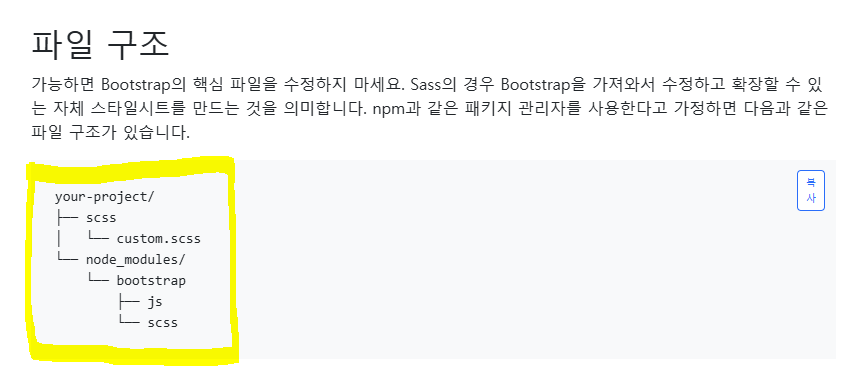
📌 ** scss 변수 및 파일 찾기
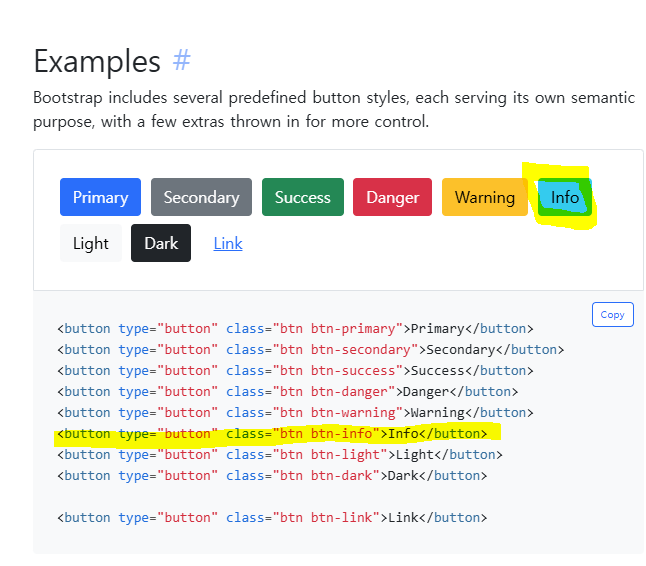

현재 찾고 싶은 부분
=> 해당 문서를 보면 btn-info 클래스의 색상은 #0dcaf0 이건데, 내 프로젝트의 색상은 #4d69fa이다.
방법
1. 일단 _variables.scss에서 해당 값 찾기 ( $info ) 검색하니 공식 문서와 같은 색상이 나옴
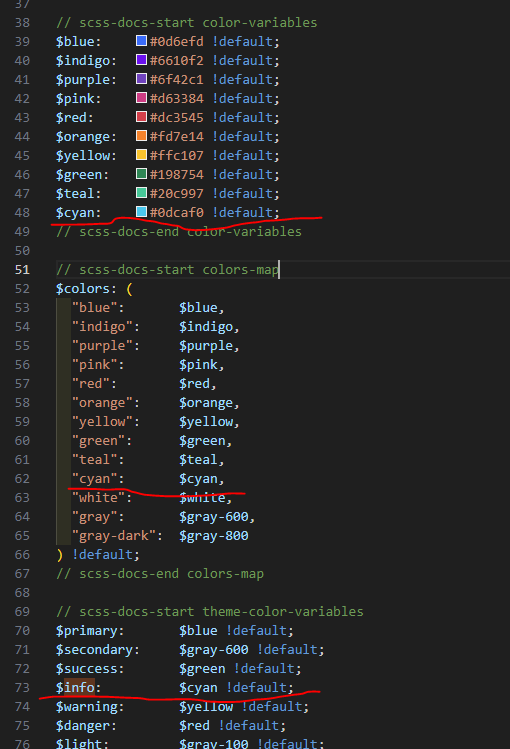
2. 해당 페이지에서 색상을 가져오는 scss는 button.scss라서 거기에서 $info, $cyan 검색
📁 node_modules/bootstrap/scss/_buttons.scss
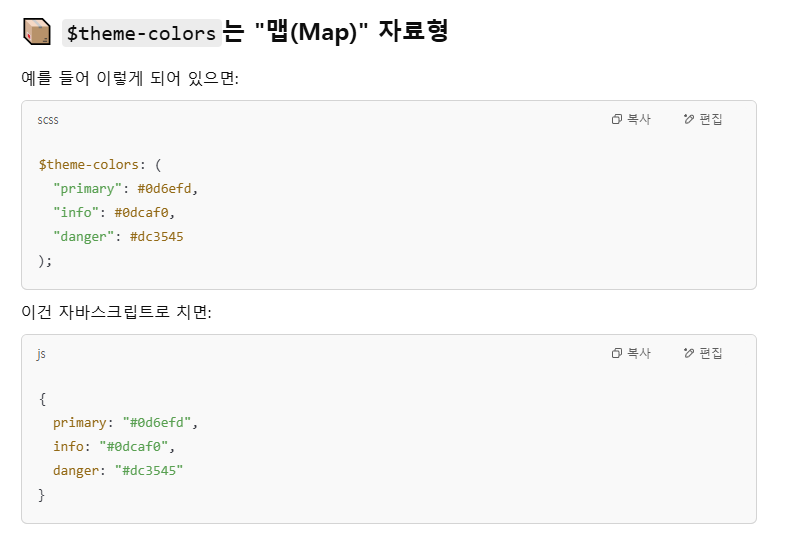
3. 안나오면 $theme-colors 검색 (지피티한테 물어봄)

이렇게 나왔는데 이게 값을 수정하는 것이 맞다고 한다.
=> 알고 보니 이건 bootstrap에서 제공하는 코드! (이전 작업자가 넣어둔 것이 아니다)
📚 해석
@each $color, $value in $theme-colors {
  .btn-#{$color} {
    @include button-variant($value, $value);
  }
}
📚 1) @each $color, $value in $theme-colors { }
=> $theme-colors 라는 맵 안에 있는 값들을 바탕으로 $color(키), $value(값)
📚 2) btn-#{$color} { @include button-variant($value, $value); }
=> class 및 스타일을 자동생성 (반복되는 부분 코드를 줄일 수 있음)

그럼 일단 생성해주는건 button.scss에서 하고 있고 이제 $theme-colors를 선언해주는 곳을 찾아야한다!
4. $theme-colors 폴더 전체 검색

=> Bootstrap의 기본 $theme-colors는 유지하면서 $custom-colors에 정의된 색상들을 추가하겠다.
=> $custom-colors를 찾으면 됨..!
5. 바로 위에 있었는데 여기에는 내가 찾는 색이 없다..😥
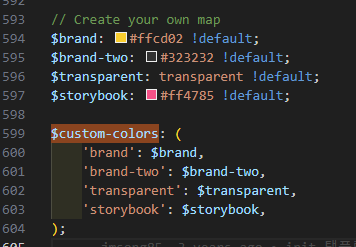
6. 해당 파일 내에서 그냥 내가 찾는 색상값을 검색해보니 나왔따..?
$info: #4d69fa;
.
.
.
@import 'node_modules/bootstrap/scss/variables';
=> 원래는 변경하려는 값보다 variables가 밑에서 불러오고 있기 때문에 안바껴야 하는 것이 정상이지만 예외!
👩🏻 예외인 이유
=> variables.scss에 있는 $info: $cyan !default; 값 때문
=> !default 뜻 👉 이 값이 정의되어 있지 않을 경우에만 사용해라
=> 즉, import 해왔을 때 해당 파일에 $info 라는 값이 정의 되어 있으면 그 값을 사용하고, 안되어 있을 시 기본 variables에 정의된 값을 사용해라
$info 값을 바꿔보니 적용 되는 것도 확인 완료!

'CSS > Bootstrap' 카테고리의 다른 글
| [Bootstrap] SCSS 변수 찾기, rfs() 가 뭔가? (1) | 2025.04.09 |
|---|---|
| [Bootstrap] @use 'sass:map'; map.get(), map-get(), map-deep-get() (0) | 2025.04.08 |
| [Bootstrap] @use 'sass:list'; / Dart Sass(모듈 시스템) 사용법 (0) | 2025.04.08 |
| [Bootstrap] $self: &; 중첩 구조에서의 사용 #{$self} (0) | 2025.04.08 |
| [Bootstrap] &self: &; @mixin 사용 scss (0) | 2025.04.07 |