
- 분류 전체보기 (199)

Notice
Recent Posts
Recent Comments
Link
250x250
| 일 | 월 | 화 | 수 | 목 | 금 | 토 |
|---|---|---|---|---|---|---|
| 1 | 2 | 3 | ||||
| 4 | 5 | 6 | 7 | 8 | 9 | 10 |
| 11 | 12 | 13 | 14 | 15 | 16 | 17 |
| 18 | 19 | 20 | 21 | 22 | 23 | 24 |
| 25 | 26 | 27 | 28 | 29 | 30 | 31 |
Tags
- owlcarousel
- node설치
- node 오류
- 이미지반응형
- window 정책변경
- package.json
- 의존성문제
- 그누보드반응형
- npm start
- fontawesome
- XEIcon
- npm install 문제
- slickslider
- 플러그인
- 웹아이콘
- 정적객체
- git lab clone
- googleicon
- 동적객체
- vscode git clone
- legacy-peer
- npm install
- 단어단위로떨어지기
- maxwidth
- 아이콘사용법
- 글자들여쓰기
- MediaQuery
- minwidth
- react npm install
- Git clone
Archives
- Today
- Total
어쩌다 알게 된 ƪ(•̃͡•̃͡ ƪ
[React] 차트 라이브러리 react-apexcharts, apexcharts 본문
728x90
설치 명령어
// npm
npm install react-apexcharts apexcharts

// yarn
yarn add react-apexcharts apexcharts
라이브러리 공식문서
Installation & Getting Started – ApexCharts.js
Integrating ApexCharts is as simple as it can get with extensive API docs and 100+ samples ready to be used. Check out all the options of ApexCharts
www.apexcharts.com
리액트 용 데모
https://apexcharts.com/docs/react-js/
Integrate in React.js – ApexCharts.js
Download Installing via npm npm install react-apexcharts --save Usage import ReactApexCharts from 'react-apexcharts' Direct <script> include Another way is to directly include it in your html <script src="https://cdn.jsdelivr.net/npm/apexcharts"></script>
apexcharts.com
import ApexCharts from 'apexcharts'
📁 Chart.js 컴포넌트
import React, { memo } from 'react';
import PropTypes from 'prop-types';
import ReactApexChart from 'react-apexcharts';
import classNames from 'classnames';

const Chart = ({ series, options, type, width, height, className, ...props }) => {
	return (
		// eslint-disable-next-line react/jsx-props-no-spreading
		<div className={classNames('apex-chart', className)} {...props}>
			<ReactApexChart
				options={{
                    colors: [
                      '#556EE6', // Primary color
                      '#D9D9D9', // Secondary color
                      '#28a745', // Success color
                      '#17a2b8', // Info color
                      '#ffc107', // Warning color
                      '#dc3545', // Danger color
                    ],
                    plotOptions: {
                        candlestick: {
                            colors: {
                            upward: '#28a745', // Success color
                            downward: '#dc3545', // Danger color
                            },
                        },
                        boxPlot: {
                            colors: {
                            upper: '#28a745', // Success color
                            lower: '#dc3545', // Danger color
                            },
                        },
                    },
                    ...options,
                }}
				series={series}
				type={type}
				width={width}
				height={height}
			/>
		</div>
	);
};
Chart.propTypes = {
	series: PropTypes.arrayOf(
		PropTypes.oneOfType([
			PropTypes.string,
			PropTypes.number,
			PropTypes.shape({
				name: PropTypes.string,
				data: PropTypes.arrayOf(
					PropTypes.oneOfType([
						PropTypes.string,
						PropTypes.number,
						PropTypes.arrayOf(
							PropTypes.oneOfType([PropTypes.string, PropTypes.number]),
						),
						PropTypes.shape({
							x: PropTypes.oneOfType([
								PropTypes.string,
								PropTypes.number,
								PropTypes.arrayOf(
									PropTypes.oneOfType([PropTypes.string, PropTypes.number]),
								),
								PropTypes.object,
							]),
							y: PropTypes.oneOfType([
								PropTypes.string,
								PropTypes.number,
								PropTypes.arrayOf(
									PropTypes.oneOfType([PropTypes.string, PropTypes.number]),
								),
								PropTypes.object,
							]),
						}),
					]),
				),
			}),
		]),
	).isRequired,
	options: PropTypes.shape({
		// eslint-disable-next-line react/forbid-prop-types
		annotations: PropTypes.object,
		// eslint-disable-next-line react/forbid-prop-types
		chart: PropTypes.object,
		// eslint-disable-next-line react/forbid-prop-types
		colors: PropTypes.array,
		// eslint-disable-next-line react/forbid-prop-types
		dataLabels: PropTypes.object,
		// eslint-disable-next-line react/forbid-prop-types
		fill: PropTypes.object,
		// eslint-disable-next-line react/forbid-prop-types
		grid: PropTypes.object,
		// eslint-disable-next-line react/forbid-prop-types
		labels: PropTypes.array,
		// eslint-disable-next-line react/forbid-prop-types
		legend: PropTypes.object,
		// eslint-disable-next-line react/forbid-prop-types
		markers: PropTypes.object,
		// eslint-disable-next-line react/forbid-prop-types
		noData: PropTypes.object,
		// eslint-disable-next-line react/forbid-prop-types
		plotOptions: PropTypes.object,
		// eslint-disable-next-line react/forbid-prop-types
		responsive: PropTypes.array,
		// eslint-disable-next-line react/forbid-prop-types
		series: PropTypes.array,
		// eslint-disable-next-line react/forbid-prop-types
		states: PropTypes.object,
		// eslint-disable-next-line react/forbid-prop-types
		stroke: PropTypes.object,
		// eslint-disable-next-line react/forbid-prop-types
		subtitle: PropTypes.object,
		// eslint-disable-next-line react/forbid-prop-types
		theme: PropTypes.object,
		// eslint-disable-next-line react/forbid-prop-types
		title: PropTypes.object,
		// eslint-disable-next-line react/forbid-prop-types
		tooltip: PropTypes.object,
		// eslint-disable-next-line react/forbid-prop-types
		xaxis: PropTypes.oneOfType([PropTypes.object, PropTypes.array]),
		// eslint-disable-next-line react/forbid-prop-types
		yaxis: PropTypes.oneOfType([PropTypes.object, PropTypes.array]),
	}).isRequired,
	type: PropTypes.oneOf([
		'line',
		'area',
		'bar',
		'pie',
		'donut',
		'scatter',
		'bubble',
		'heatmap',
		'radialBar',
		'rangeBar',
		'candlestick',
		'boxPlot',
		'radar',
		'polarArea',
	]),
	width: PropTypes.oneOfType([PropTypes.string, PropTypes.number]),
	height: PropTypes.oneOfType([PropTypes.string, PropTypes.number]),
	className: PropTypes.string,
};
Chart.defaultProps = {
	type: 'line',
	width: '100%',
	height: 'auto',
	className: null,
};

export default memo(Chart);
📁 ChartList.js
import Chart from "../components/extras/Chart"

const ChartList = () => {
    return(
        <>
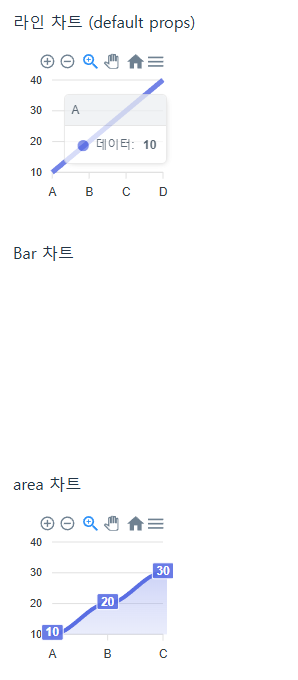
            <p>라인 차트 (default props)</p>
            <Chart
                width={160}
                height={160}
                options={{
                    chart: { type: "bar" },
                    colors: ['#556EE6', '#28a745', '#ffc107'],
                    plotOptions: {
                        bar: { columnWidth: '50%' },
                    },
                    xaxis: { categories: ['A', 'B', 'C', 'D'] },
                }}
                series={[{ name: "데이터", data: [10, 20, 30, 40] }]}
            />

            <p>Bar 차트</p>
            <Chart
                width={160}
                height={160}
                type={'bar'}
                options={{
                    chart: { type: "bar" },
                    colors: ['#556EE6', '#28a745', '#ffc107'],
                    plotOptions: {
                        bar: { columnWidth: '50%' },
                    },
                    xaxis: { categories: ['A', 'B', 'C', 'D'] },
                    series: { name: "데이터", data: [10, 20, 30, 40] },
                    lable: {label: ['A', 'B', 'C', 'D'] },
                }}
            />

            <p>area 차트</p>
            <Chart
                width={160}
                height={160}
                type={'area'}
                options={{
                    chart: { type: "bar" },
                    colors: ['#556EE6', '#28a745', '#ffc107'],
                    plotOptions: {
                        bar: { columnWidth: '50%' },
                    },
                    xaxis: { categories: ['A', 'B', 'C', 'D'] },
                }}
                series={[{ name: "데이터", data: [10, 20, 30, 40] }]}
            />

            <p>pie 차트</p>
            <Chart
                width={160}
                height={160}
                type={'pie'}
                options={{
                    chart: { type: "bar" },
                    colors: ['#556EE6', '#28a745', '#ffc107'],
                    plotOptions: {
                        bar: { columnWidth: '50%' },
                    },
                    xaxis: { categories: ['A', 'B', 'C', 'D'] },
                }}
                series={[{ name: "데이터", data: [10, 20, 30, 40] }]}
            />
        </>
    )
}

export default ChartList
728x90
'개발 > 🟦 React' 카테고리의 다른 글
| [React] 18버전 컴포넌트 props 매개변수 기본값 warning (1) | 2025.04.30 |
|---|---|
| [React] hook, useMemo(), useCallback() (0) | 2025.04.29 |
| [React] default export와 named export (0) | 2025.04.25 |
| [React] 라이브러리 import classNames from 'classnames'; (0) | 2025.04.24 |
| [React] 해당 줄에서만 eslint 경고 끄기 (0) | 2025.04.14 |
Comments