
- 분류 전체보기 (201)

Notice
Recent Posts
Recent Comments
Link
250x250
| 일 | 월 | 화 | 수 | 목 | 금 | 토 |
|---|---|---|---|---|---|---|
| 1 | 2 | 3 | ||||
| 4 | 5 | 6 | 7 | 8 | 9 | 10 |
| 11 | 12 | 13 | 14 | 15 | 16 | 17 |
| 18 | 19 | 20 | 21 | 22 | 23 | 24 |
| 25 | 26 | 27 | 28 | 29 | 30 | 31 |
Tags
- npm install
- git lab clone
- legacy-peer
- package.json
- 그누보드반응형
- 플러그인
- MediaQuery
- node 오류
- vscode git clone
- googleicon
- XEIcon
- 웹아이콘
- fontawesome
- minwidth
- window 정책변경
- 이미지반응형
- slickslider
- 정적객체
- 글자들여쓰기
- Git clone
- owlcarousel
- react npm install
- 의존성문제
- npm install 문제
- maxwidth
- npm start
- 아이콘사용법
- 동적객체
- node설치
- 단어단위로떨어지기
Archives
- Today
- Total
어쩌다 알게 된 ƪ(•̃͡•̃͡ ƪ
다국어 적용_NextIntClientProvider, next-intl, useTranslations 본문
728x90
src/app/
  layout.tsx          ← 전체 앱 공통 레이아웃
  page.tsx            ← 홈 페이지
  dashboard/
    layout.tsx        ← 대시보드 전용 레이아웃
    page.tsx          ← 대시보드 페이지
[locale]/layout.tsx ← 여기서 NextIntlProvider 적용
 ├─ page.tsx       ← 여기서 useTranslations() 사용 가능
 ├─ about/page.tsx ← 여기서도 useTranslations() 사용 가능
└─ dashboard/page.tsxlayout에 한 번만 Provider 넣으면 하위 페이지들에서 사용 가능
📂 폴더구조
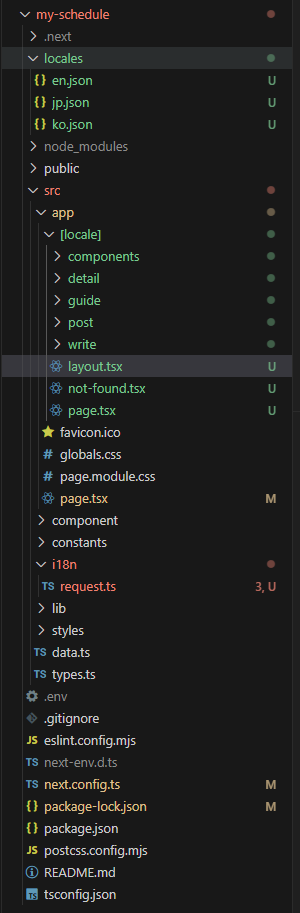
📂 src/app/[locale]/layout.tsx
// 내가 테스트 하고 있는 코드
// src/app/[locale]/layout.tsx

import type { Metadata } from "next";
import { Geist, Geist_Mono } from "next/font/google";
import "../globals.css";
import { NextIntlClientProvider } from "next-intl";
import { ReactNode } from "react";

// 정적 import - 다국어
import koMessages from '../../../locales/ko.json';
import enMessages from '../../../locales/en.json';
import jpMessages from '../../../locales/jp.json';

interface RootLayoutProps{
  children:ReactNode;
  params: Promise<{ locale: 'ko' | 'en' | 'jp' }>; // 다국어 설정
}

const messagesMap = {
  ko: koMessages,
  en: enMessages,
  jp: jpMessages
}

const geistSans = Geist({
  variable: "--font-geist-sans",
  subsets: ["latin"],
});

const geistMono = Geist_Mono({
  variable: "--font-geist-mono",
  subsets: ["latin"],
});

export const metadata: Metadata = {
  title: "Create Next App",
  description: "Generated by create next app",
};

export default async function RootLayout({ children, params }: RootLayoutProps) {
  const { locale } = await params;
  const messages = messagesMap[locale] || koMessages;

  return (
    <html lang={locale}>
      <body
        className={`${geistSans.variable} ${geistMono.variable} antialiased`}
      >
        <NextIntlClientProvider locale={locale} messages={messages}> {/* 다국어 설정 */}
          {children}
        </NextIntlClientProvider>
      </body>
    </html>
  );
}
📂 src/app/[locale]/page.tsx
'use client';
import { useTranslations } from "next-intl";

export default function Home() {
  const t = useTranslations(''); // 다국어

  return (
    <main>
    	<Button text={t('가이드 바로가기')} />
    </main>
  );
}
http://localhost:3100/ko
http://localhost:3100/en
http://localhost:3100/jp
이렇게 바꾸면 다국어 가능
// 언어 설정 버튼
import { useRouter } from "next/navigation";

const router = useRouter();

const changeLocale = (locale: 'ko' | 'en' | 'jp') => {
    // 현재 경로 가져오기
    const pathname = window.location.pathname;
    // locale 부분만 바꿔서 push
    const segments = pathname.split('/');
    segments[1] = locale;
    router.push(segments.join('/'));
    setIsLangOpen(false);
}

return(
    {/* 다국어 설정 */}
    <DefaultPopup
        text="언어 설정"
        isOpen={isLangOpen}
        setIsOpen={setIsLangOpen}
        content={
          <>
            <button onClick={() => changeLocale('ko')}>한국어</button>
            <button onClick={() => changeLocale('en')}>En</button>
            <button onClick={() => changeLocale('jp')}>Jp</button>
          </>
        }
        position={PopupPosition.Bottom}
    />
)
728x90
'개발 > 🟦 React-Next.js' 카테고리의 다른 글
| "use client" // React Hook은 클라이언트에서만 동작하기 때문에 (1) | 2025.08.27 |
|---|---|
| 🟦 [React] Next.js (1) | 2025.03.23 |
| 🟦 [React] Next.js (0) | 2025.03.22 |
'개발/🟦 React-Next.js' Related Articles
more


Comments